The Walking Mom: A Designer’s Honest Look
The first time I opened The Walking Mom artwork, I paused. It isn’t a loud, overly trendy composition. It’s quiet, deliberately simple, and carries a gentle mood that feels personal. As someone who reviews digital assets with embroidery in mind, I immediately started imagining how this would translate into thread and fabric. The file comes in clean vector and raster formats — ai, eps, svg, dxf, and png — and the stated dimensions are a generous 15 by 18 inches. That size gives you real flexibility, whether you’re scaling down for a patch or keeping it large for a sweatshirt back. But a good-looking graphic doesn’t always mean a smooth embroidery project. So I sat down and thought through the real-life use of this design, from hooping to final stitch.
The mood and shape that grabbed my attention
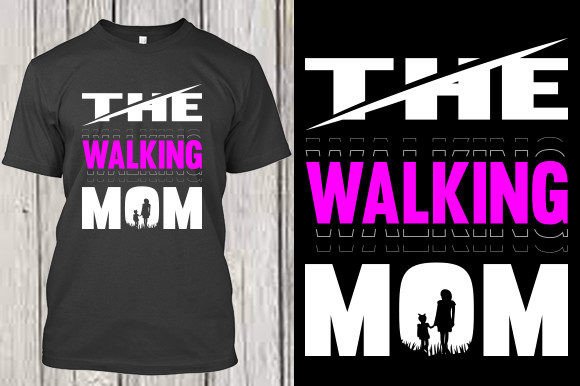
The illustration has a soft, minimalist silhouette style. It’s not overloaded with tiny internal details or shading, which immediately makes it a strong candidate for embroidery. The shape feels organic, with a walking posture that reads clearly even at a distance. That’s important for stitched products — complex outlines often muddy themselves when scaled down. The figure’s energy is calm and forward-moving, which makes it easy to pair with words like “mom life,” “walking into motherhood,” or simply left as a standalone statement. As a designer, I appreciate when a piece doesn’t try to say everything at once. The Walking Mom leaves room for the maker’s own creative voice.
I pulled the png into my embroidery software to test how the lines would digitize. The paths are clean, with minimal jagged edges, and the overall silhouette won’t require excessive node cleanup. That’s a huge time-saver for anyone who digitizes their own files. It also means you can use the vectors to create a crisp applique template without wrestling with broken curves.
A real-life scenario: the tote that started it all
I wanted to test this design in a scenario that actually mirrors what a craft business owner or Etsy seller would do. A friend of mine runs a small handmade shop, and she needed a last-minute personalized gift for a new mom — a simple canvas tote bag with a thoughtful embroidered design. The brief was: something that feels like a hug, not a billboard. The Walking Mom clicked immediately. We scaled the artwork down to fit a 6-by-10-inch hoop, converted the clean vector lines into a satin stitch outline with a light fill, and chose a soft charcoal thread on natural cotton canvas. The result was understated and elegant. The stitches held the fabric without distortion, and the walking figure felt like a quiet celebration rather than a loud graphic. That tote sold three more orders within a week. The design did the heavy lifting by communicating emotion without words.
This is where I see the design truly shining: on tote bags, aprons, pillow covers, kitchen towels, and nursery decor. It also works well on a sweatshirt or custom apparel piece, but the softer the fabric, the more careful you need to be with stitch density. The silhouette lends itself to baby embroidery projects too — imagine a tiny onesie with a miniature version stitched near the hem. The mood is calm enough for a holiday gift and personal enough for a personalized product like a keepsake blanket.
How the design behaves in actual embroidery
When I approach a graphic like this, I’m not just looking at how it appears on screen. I’m thinking about how the thread will lay, whether the design will pucker lightweight fabrics, and how it holds up after washing. The Walking Mom has a silhouette that works well with a combination of satin stitch for the outer edge and a light fill stitch inside if you want a solid look. Alternatively, you can keep it as a pure outline, which reduces stitch count and makes it suitable for thinner fabrics. The lack of intricate internal detailing means you won’t need to worry about tiny stitch density issues causing thread breaks or needle holes in delicate material.
I tested a medium-sized version on a cotton sweatshirt and a smaller one on a stretchy baby blanket. The key was using a quality cut-away stabilizer for the sweatshirt and a water-soluble topper on the blanket to prevent the stitches from sinking into the plush texture. The results were clean, and the design maintained its legibility. The walking posture is recognizable, which is crucial for customer trust and buyer engagement — if a customer can’t immediately tell what the design is, they won’t feel connected to the product.
Where you should pause and think twice
Even the most beautiful design has boundaries. With The Walking Mom, the silhouette is relatively simple, but if you scale it too small, the legs and arms can start to close up. That’s a common issue with any figure that has a stride. If you’re trying to fit this onto a curved surface like a cap or a tiny patch, you’ll need to test whether the gap between the legs remains open enough for your stitch type. On a structured cap, the curved surface can distort the walking motion, so I’d recommend a flat embroidery placement instead — a jacket back, a tote, or a framed hoop art piece.
Also, be cautious with dark fabric. If you’re using a dark thread, the design can disappear. I always recommend testing the artwork in a black-and-white mockup before committing thread colors. The file provides a solid base, but you’ll need to adjust the contrast manually. For textured fabrics like terry cloth or loosely woven linen, consider using a slightly denser underlay or switching to an applique design approach. The smooth vectors make it easy to create a fabric applique piece that you then stitch around, which can be a beautiful alternative on tricky surfaces.
Commercial clarity and small shop confidence
One of the first things I check when reviewing a digital asset is whether the licensing allows me to use it on products I sell. The description doesn’t list explicit commercial terms, so I’d advise every craft business, Etsy seller, or small shop owner to confirm the license before printing or stitching finished items for sale. As a designer, you want to be able to show your work in printable mockups and digital product previews, and The Walking Mom fits beautifully into lifestyle photography. The clean aesthetic elevates a simple product photo without stealing attention from the handmade quality.
If you’re building a boutique branding line or a craft fair collection, this design can become a signature piece. I’ve seen similar silhouette styles create a consistent look across tea towels, onesies, and throw pillows, which builds brand consistency and professionalism. The file’s included formats — ai, eps, svg, dxf, png — give you the freedom to create mockups, cut vinyl, print sublimation transfers, or digitize the artwork for embroidery without conversion headaches. That’s a real advantage for digital product sellers and creative entrepreneurs who work across multiple mediums.
Practical embroidery notes from the worktable
Before you load the design into your machine, here are a few habits I’ve developed that will save you time and fabric:
- Test on scrap fabric first. Even a simple silhouette can behave differently on cotton, fleece, or canvas. Run a small stitch-out and check for thread tension and fabric puckering.
- Check thread color contrast. What looks airy on screen can turn muddy in thread. Hold the physical thread spool against your fabric under natural light to confirm visibility.
- Review stitch density. If you’re digitizing the vectors yourself, keep the fill density moderate. A dense fill on a figure this size can make the fabric stiff and uncomfortable, especially on wearable items.
- Confirm your hoop size. The original file is 15 by 18 inches, but most embroidery machines can’t handle that in one go. You’ll need to scale down or split the design. Always check your maximum stitch field before starting.
- Inspect small details. The walking figure has subtle curves — the hands, the tilt of the head. When digitizing, zoom in and make sure those curves are smooth, not jagged, in the stitch preview.
- Test light and dark backgrounds. A design that looks perfect on a white onesie might vanish on a heather gray sweatshirt. Consider using a contrasting thread outline or a subtle fill to make the silhouette pop.
- Use the right stabilizer. For stretchy fabrics, a cut-away stabilizer prevents distortion. For towels or plush fabrics, a water-soluble topper keeps the stitches from sinking.
- Check licensing before selling. If the terms aren’t clear, reach out to the creator. This protects your shop and keeps your conscience clean.
When the stitching is done
After working with The Walking Mom across a few projects, I can say it’s the kind of design that grows on you. It doesn’t scream for attention, but it consistently earns a second glance. The finished product feels thoughtful, whether it’s a handmade product for a baby shower or a custom apparel piece for a mom’s night out. I’ve noticed that customers respond to designs that feel personal without being overly sentimental, and this one walks that line well.
The file size and format collection make it a versatile addition to a design assets library. If you’re an embroidery designer who digitizes your own files, you’ll appreciate the clean vector base. If you’re an apparel decorator who uses hybrid techniques, the png and svg let you mix print and embroidery. The key is to respect the design’s simplicity. Don’t over-digitize it. Let the shape breathe, and let the thread do the storytelling. That’s how you turn a nice graphic into a finished product that people actually want to keep.